

GGPoker Escrow Trade Guide: Buy or Sell Poker Assets for Free
With the new Escrow Trade feature, GGPoker is giving the players a way to swap assets on their platform.
Holding onto a tournament ticket you can’t use, or don’t want? Swap it for cash, C$ (Cash Game Dollars), or T$ (Tournament Dollars).
Have some C$ laying around but want to play more tournaments? Swap it for cash, T$, or an MTT ticket.
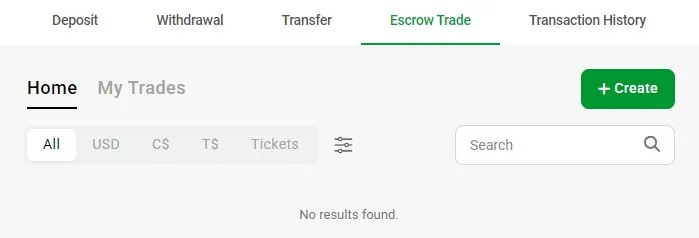
You get the idea. Trading poker assets has always happened, with players connecting on social media or forums. But the issue there is, guarantees are harder to find, and scams are more prevalent.
To avoid these worries, GGPoker is bringing this P2P marketplace onto their platform and offering the Escrow Trade service free of charge.
We’ll explain which poker assets Escrow Trade can swap, how to swap your assets, and who is eligible for Escrow Trade.
What is GGPoker’s Escrow Trade?
Escrow Trade is an integrated P2P trading feature inside the GGPoker Cashier. It functions just like other escrow services, except it only deals with poker assets from GGPoker, and there are no fees.
With GGPoker Escrow Trade, you can:
- Buy Poker Assets: Browse the Escrow Trade marketplace, join a Trade Chat to confirm the details, and send payment after reaching an agreement. Once the seller receives your funds, the asset transfers out of escrow into your account.
- Sell Poker Assets: List your poker asset, wait for a Trade Chat from potential buyers, reach an agreement, and receive payment. Once funds arrive, confirm you received them, and the buyer will get their asset.
In GGPoker Escrow Trades, the asset is locked once when the transaction begins. If the buyer and seller reach an agreement, that item cannot be resold to another buyer to collect double payments.
If there is any kind of dispute after the agreement is reached, the buyer and seller will have to “submit evidence for review and resolution.”
What You Can Trade with Escrow Trade
Escrow Trade allows you to buy or sell four asset types:
- Cash: Your real-money USD balance, usable for all games on GGPoker.
- C$ (Cash Game Dollars): C$ is GGPoker's cash-game currency, where 1 C$ carries the same value as $1. It's awarded through promotions and leaderboards. It can buy you into cash games, but it can't be withdrawn directly (which is exactly why players would want to trade it for other assets).
- T$ (Tournament Dollars): The tournament equivalent of C$, used to register for MTTs and Spin & Gold buy-ins. Use it to pay for your buy-ins to tournaments, but you won’t be able to withdraw.
- Tournament Tickets: Entries to specific tournaments, often with expiry dates.
Obviously, Cash is the most versatile of these assets, but the other three are locked to specific uses. When those uses don’t match what the player wants, you can expect to see it on the Trade Escrow marketplace.
How to Sell Assets with GGPoker Escrow Trade
We’re going to explain how to use GGPoker Escrow Trade to sell USD, C$, T$, and Tournament Tickets.
Once you create the listing, that asset is locked onto the marketplace. This is to prevent players using the asset while it is listed, which could create false listings.
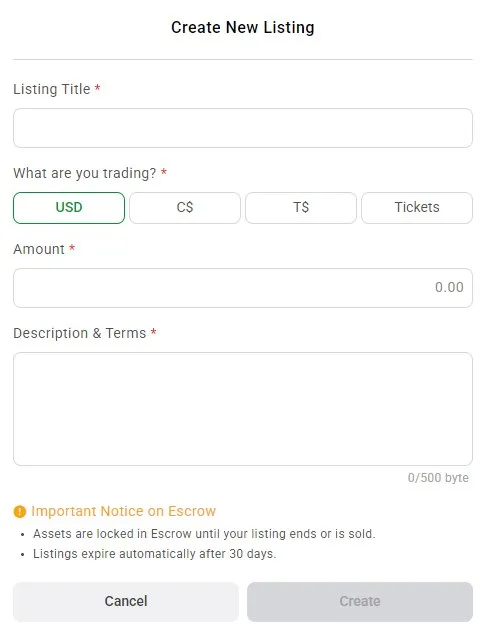
Here are the steps to sell assets with Escrow Trade:
- Create a Listing: Visit the GGPoker Cashier, and select the Escrow Trade tab. Then, select Create. Decide what asset to sell, either USD, C$, T$, or Tickets. There are no fees for listing assets in Escrow Trade, but listings do expire after 30 days, automatically.
- Wait for a Trade Chat: A prospective buyer reviews your terms and enters a dedicated Trade Chat to confirm the details directly.
- Item is Locked in Transaction: When the escrow transaction begins, your asset is locked to that transaction. This means it will be held by GGPoker for the buyer, until you confirm the buyer has paid for it. No other deals can be made with this asset during this time..
- Payment Sent by Buyer: The buyer sends you their payment and marks it as sent. There are no fees for the seller when they receive the payment. The amount sent will be the same as the amount received.
- Seller Confirms Received Funds: The seller confirms they've received payment, and only then is the locked asset released to the buyer.
If something goes wrong, like the buyer claiming to have sent payment while you haven’t received it, both parties can submit evidence for review and a resolution process. GGPoker will mediate and resolve the problem. Trade Chat and other details will be reviewed.
Important Note: The site's Withdrawal Policy states:
Player Transfers
For security reasons, players are restricted from withdrawing transferred funds that originated directly from deposits or other transfers.
This appears to mean that if you sell an item on Escrow Trade, like T$ for example, and another player pays you USD, that payment is not withdrawable.
How to Buy Assets with GGPoker Escrow Trade
Now we’ll explain how to use GGPoker Escrow Trade to buy USD, C$, T$, and Tournament Tickets. If you don't have any funds or assets to buy with, you have to deposit funds to GGPoker first.
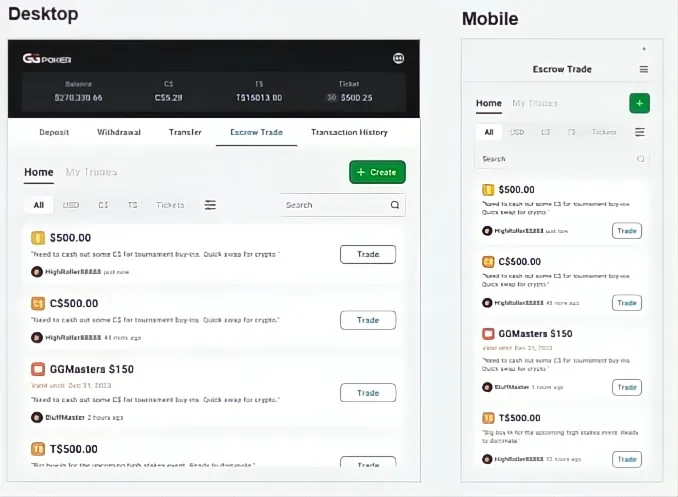
Here are the steps to buy assets with Escrow Trade:
- Browse Escrow Trade Listings: Look for the asset you want to trade for by visiting the GGPoker Cashier, then selecting the Escrow Trade tab. Filter listings by USD, C$, T$, or Tickets, or search for specific listings.
- Select a Listing and Start Trade Chat: Review the terms and enter a dedicated Trade Chat. Here, you can discuss the terms with the seller directly.
- Start the Transaction: As the escrow transaction starts, the asset you’re buying/trading for is locked. You’re now the only one trading for this item, unless you cancel the trade.
- Make Payment: As the buyer, you need to send payment and marks the payment as sent. There are no fees attached to the payment. The only cost is the payment price for the asset.
- Confirmation and Release: The seller confirms they've received your payment, and then the locked asset is released to you, the buyer.
If anything goes wrong, such as a seller not confirming they received the payment after you sent it, use the dispute resolution service. Contact GGPoker directly, share transaction details, and details of the Escrow Trade.
Availability & Eligibility for GGPoker Escrow Trade
This is a crucial details for any player getting excited about Escrow Trade. Not everyone is eligible.
Escrow Trade is available only in jurisdictions that support P2P cash transfers, the same way GGPoker already controls direct C$ transfers between players to eligible regions.
The way to check your Escrow Trade eligibility is simple:
- Open GGPoker client and log in.
- Open the Cashier.
- Check whether Escrow Trade appears for your account. It should be beside Deposit, Withdrawal, and Transfer, and before Transaction History. If it's not there, it isn't enabled for your jurisdiction.
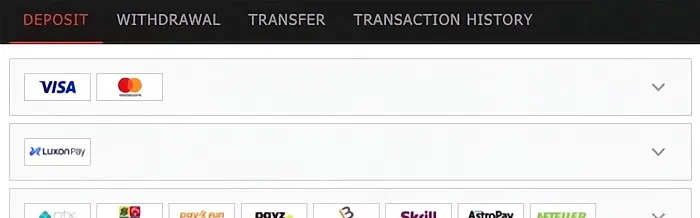
The site's Terms and Conditions state:
9.6 Player-to-Player transfers ("P2P") is only available in certain jurisdictions, and are subject to the following conditions:
1. Both the sender and the recipient must have successfully completed the required level of player verification Checks;
2. Both parties must be located in a jurisdiction where P2P transfers are legally permitted and supported by GGPoker; and
3. Transferred funds are intended solely for use on GGPoker and are not eligible for withdrawal.
If you don’t see the option for Escrow Trade, it’s unlikely to change. GGPoker is extremely unlikely to lift any kind of restriction, and your account has probably been flagged for being inside a P2P-prohibited jurisdiction. This doesn’t affect your games, but it does affect your usage of Escrow Trade.
If you have any questions, feel free to contact GipsyTeam directly for quick answers and support. We can also activate unique rewards and let you know about the best promotions happening on GGPoker, or other poker sites.
GGPoker Escrow Trade Frequently Asked Questions
Get answers to common questions about GGPoker’s Escrow Trade.
🔹Who can use Escrow Trade on GGPoker?
Escrow Trade is available to GGPoker players in jurisdictions that permit P2P cash transfers. Eligibility is set by your region rather than your individual account standing. To check whether you can use Escrow Trade, open the GGPoker Cashier and look for the Escrow Trade option.If it doesn't appear, it isn't currently enabled for your jurisdiction.
🔹 What are the Escrow Trade fees on GGPoker?
Escrow Trade is completely free on GGPoker. There are no fees to list an asset, no charges for buyers, and no commission taken from sellers. The amount a buyer sends is the exact amount the seller receives.
🔹 Can I withdraw funds from Escrow Trade deals?
The GGPoker withdrawal policy states that "For security reasons, players are restricted from withdrawing transferred funds that originated directly from deposits or other transfers." This appears to mean that if you sell an item using Escrow Trade, and a user transfers USD to you, a withdrawal is not possible.
🔹 How to buy C$ with Escrow Trade on GGPoker?
To buy C$ (Cash Game Dollars) with Escrow Trade, open the GGPoker Cashier and go to the Escrow Trade marketplace. Filter the listings for C$ type, and start a Trade Chat with a seller. Once you are satisfied with the details, start the transaction. The C$ will now be a locked asset in GGPoker’s escrow, held there until you make payment (confirmed received by the seller). After that, you receive your C$.
🔹 How to buy T$ with Escrow Trade on GGPoker?
To buy T$ (Tournament Dollars) with Escrow Trade, open the GGPoker Cashier and select the Escrow Trade marketplace. Filter for T$ listings, choose one, and confirm the details in the Trade Chat. After you send payment and the seller confirms they've received it, the T$ moves out of escrow into your balance, ready for MTT and Spin & Gold buy-ins.
🔹 How to buy tournament tickets with Escrow Trade on GGPoker?
To buy tournament tickets with Escrow Trade, go to the Escrow Trade marketplace in the GGPoker Cashier and filter for ticket listings. Review the event and terms, agree in the Trade Chat, then send payment and mark it as sent. Once the seller confirms receipt, the ticket is released to your account. Always check the ticket's eligible event and any expiry date before buying.
🔹 How to sell C$ with Escrow Trade on GGPoker?
To sell C$ with Escrow Trade, open the GGPoker Cashier, go to Escrow Trade, and click the green “Create” button to make a C$ listing with your terms. When a buyer starts a Trade Chat and you agree, your C$ is locked in escrow so it can't be sold twice. The buyer sends payment, and once you confirm you've received it, the C$ is released to them. Listing and selling are free.
🔹 How to sell T$ with Escrow Trade on GGPoker?
To sell T$ with Escrow Trade, open the GGPoker Cashier, select Escrow Trade, and select the green “Create” button to create a T$ listing. Once a buyer agrees the terms in the Trade Chat, your T$ is locked in escrow to prevent double-selling. After the buyer sends payment and you confirm receipt, the T$ transfers to them. There are no seller fees, so you receive the full agreed amount.
🔹 How to sell tournament tickets with Escrow Trade on GGPoker?
To sell tournament tickets with Escrow Trade, go to the Escrow Trade section of the GGPoker Cashier and hit the green “Create” button to make an MTT ticket listing. When a buyer confirms the terms in the Trade Chat, the ticket is locked in escrow. The buyer sends payment, and once you confirm receipt, the ticket is released to them. Selling is free, and you receive the full amount agreed.