




Pinco Poker is a new browser-based online poker site, accessible to PC and mobile players with no downloads required. With a variety of poker games and valuable promotions on offer, Pinco Poker is an exciting alternative to the more established online poker sites.
If you want to learn how to download Pinco Poker to your device, this guide will teach you exactly what you need to do to get into the action without any additional software. Keep reading to find out how to set up your Pinco Poker account on a desktop computer, iPhone, or an Android phone or tablet.
How to Download Pinco Poker for Desktop Computers (PC & MacOS)
Pinco Poker is fully integrated with Pinco Casino, allowing players to play online poker directly in the browser-based platform. You can access Pinco Poker on your desktop computer or laptop, whether it runs on Windows or MacOS, by simply navigating to the operator’s website and clicking the Pinco Poker tab in the left-hand menu.


The browser-based online poker client is the only way to access online poker on your computer at Pinco Poker, as a downloadable app for PCs is not available. Playing in the browser may not be ideal for multi-tabling, but it is currently the only option offered. On the other hand, playing in the browser allows for quick access without any software downloads needed.

How to Download Pinco Poker on Android Devices
Are you looking to play Pinco Poker on your Android-powered device, such as a Samsung Galaxy phone? If so, follow these simple steps to get started:
- Visit the official Pinco Poker website in your mobile internet browser.
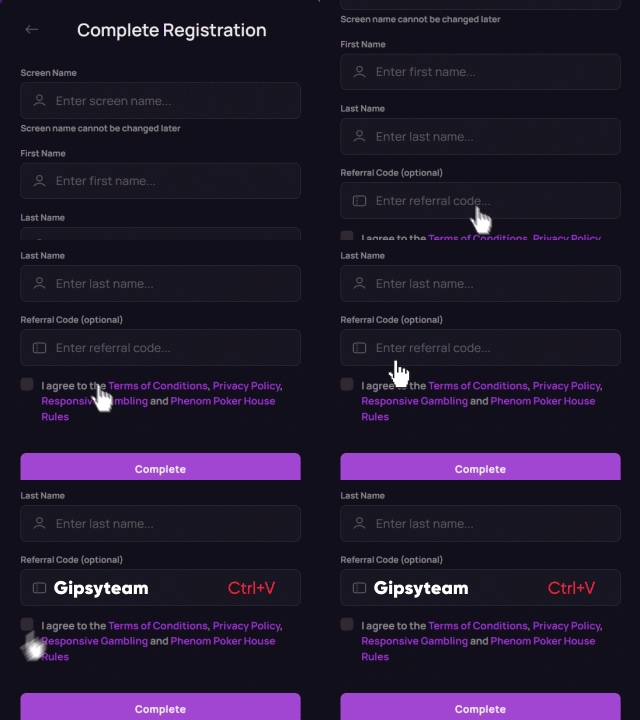
- Click the “Registration” button in the top right corner.
- Complete the registration with promo code POK-GTCOM and log in to your account.
- Click the “Menu” button and navigate to Pinco Poker.
- Access poker tables directly in your mobile browser.
Much like the desktop version of Pinco Poker, the Android version is only available in the internet browser. While a downloadable Pinco Casino app is available to Android users, this app only gives access to casino games, and poker is not available in it. So, if you are looking to play online poker on your Android device, your mobile browser is your only option.

How to Download Pinco Poker on Your iPhone
When it comes to playing Pinco Poker on your iPhone, the situation is the same as with Android devices, as a downloadable app is not available. Instead, follow these steps to start playing:
- Visit the Pinco Poker website in your iPhone’s internet browser.
- Click the “Registration” button in the top right corner.
- Complete your registration with promo code POK-GTCOM and log in.
- Navigate to the Pinco Poker section from the main menu.
- Access the poker tables directly and play in the browser.
Unlike Android users, who can download the Pinco Casino app, iOS users don’t have any dedicated mobile apps available on the site. Instead, all action is only offered through the internet browser, whether you are looking to play poker or casino games.

Pinco Poker Mobile Features
Pinco Poker was launched in 2025 on a platform with a strong focus on casino games and sports betting. As such, the operator gets a lot of traffic from gamblers who aren’t necessarily there to play poker, which makes the poker games quite juicy.
The platform is only available in the browser version, and the lack of downloadable poker apps may be concerning to serious poker players. Yet, the browser-based version offers quite a few amazing features on both desktop and mobile devices, including:
- $1,000 welcome bonus
- Bad beat jackpot
- Customizable table themes and backgrounds
- Four color deck
- Configurable bet sliders
- Automatic buy-in and top-up
- Display stack in big blinds
The perks and features available at Pinco Poker make the site worth considering, even if multi-tabling can be a bit challenging in the browser, and the soft nature of the games gives serious poker players a chance at a very high win-rate.

Start Playing at Pinco Poker Today
Are you ready to get started? At Pinco Poker, you can play without needing to download any software or install any apps. Simply visit the operator’s website in any internet browser, and you can set up an account and be in action within minutes.
If you have any questions about setting up your Pinco Poker account, playing on different devices, or other aspects of Pinco Poker, don’t hesitate to ask us. Our customer support agents are available around the clock and are happy to answer your questions and point you in the right direction.

Other Mobile Poker Sites Worth Considering
Mobile poker players may prefer a poker room they can download and install on their phone or tablet, allowing for easier multi-tabling. If that’s what you’re looking for, GGPoker may be your best option, as it’s the world’s biggest online poker site with dedicated poker apps for all mobile devices.
CoinPoker offers a strong crypto-based alternative, and you can download the app to your phone and get access to their $2,000 welcome bonus today. WPT Global offers satellites to major live events through its mobile poker app, which you can install on your iPhone or Android device as well.


